I Told It to Run Every 10 Minutes. It Ran 17 Times.
A free scheduled job kept missing its time. Counting the runs showed 17 where 128 should have been. How I fixed it without buying a server.
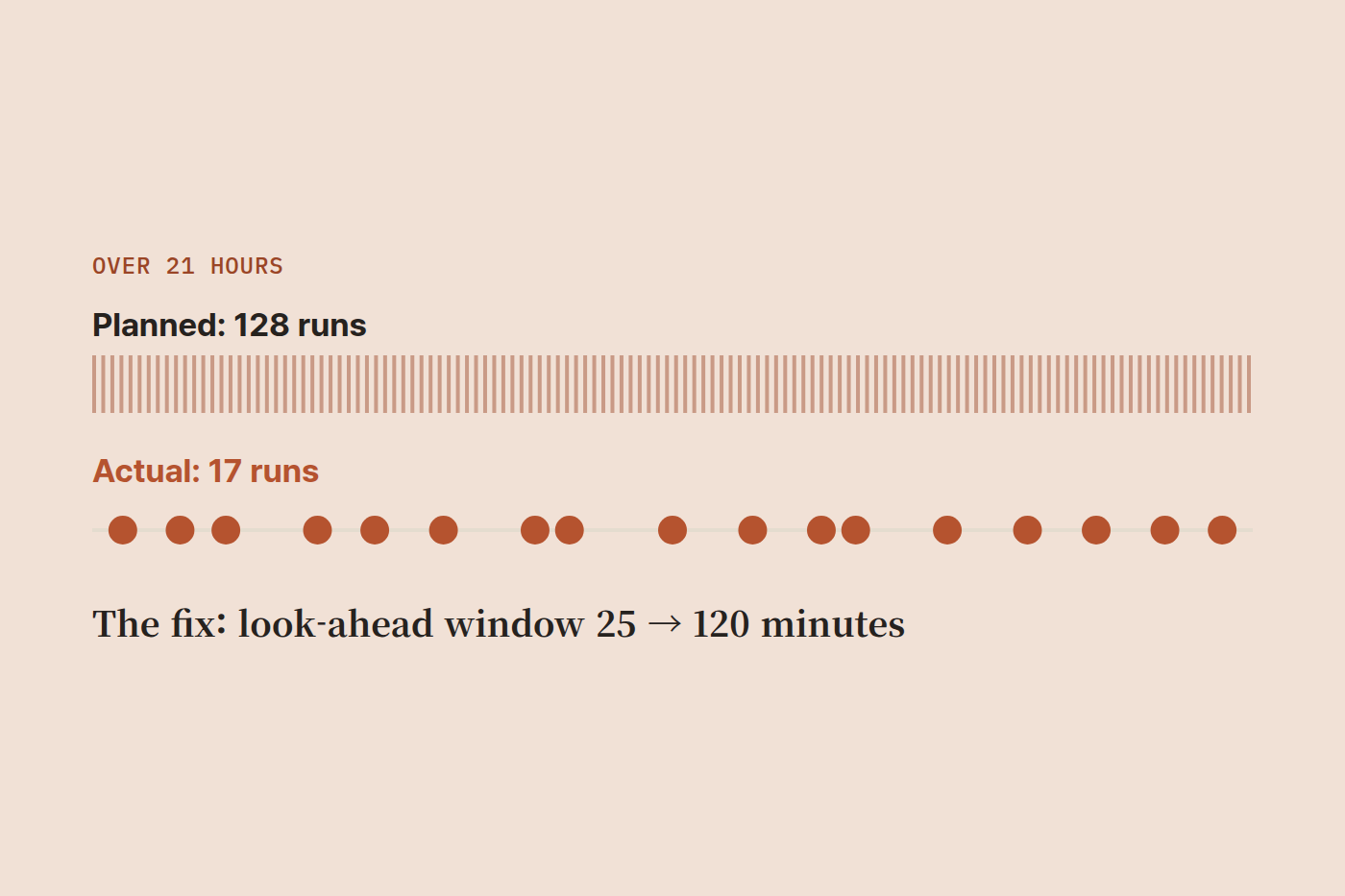
I built a small automation that sends me a draft at a set time. No server, no monthly bill. Then one day the draft didn't arrive. The code was fine. There were no errors. When I counted the actual runs, it had fired 17 times over 21 hours where it should have fired 128.
What I built
I write my social posts a few days ahead and mark each one with the time it should go out. When that time comes, the automation sends me the text on Telegram and I paste it in from my phone. The whole thing only works if the alert arrives on time.
I built it on GitHub Actions scheduled runs. You put one file in the repository and ask Claude to make it run every ten minutes.
No server to manage, and nothing to pay on a public repository. Here is the whole flow.
That one arrow coming down from the top is the whole story. GitHub only does the waking. Everything else is my own code. And the waking is the part I cannot fix.
You cannot fix what you only have a hunch about
On the day the draft didn't arrive I went straight to the code. Nothing was wrong with it. So I changed direction and asked a different question: what time did this thing actually run? GitHub keeps every execution record. I asked Claude Code to pull the start times of recent runs and compute the gaps.
| Runs due at one per 10 minutes | 128 |
| Runs that actually happened | 17 |
| Average gap between runs | 80 minutes |
| Longest gap | 214 minutes |
There was a stretch of three and a half hours with no run at all. Only after seeing these numbers did I know what to fix. Until then I thought it was my code.
This is the design, not a defect
GitHub's scheduled runs put every user in the world into one queue. When load spikes, runs get pushed back, and pushed back far enough they are dropped entirely. On the free plan your jobs sit at the bottom of that queue.
Paying does not fix it. A paid plan moves you up somewhat, but GitHub does not promise punctuality on any plan. This is not a bug. Punctuality was never part of what the free tier promised. I assumed it was and built structure on top of that assumption.
The dangerous part is the silence
The draft never went out, and nothing on the GitHub side looked wrong. Every run in the history is green and no failure alert arrives. A run that never happened cannot fail, so there is nothing to report.
I made the same point when I automated our quote emails. Automation fails quietly. When a person stops doing a task, you notice. When a machine stops doing it, you don't.
Buying a server would solve it
Spin up a Linux instance on AWS, put a cron entry on it, and the problem disappears. The clock inside that machine is yours and has nothing to do with anyone else's load.
In exchange you keep 720 hours running to use three of them. A zero turns into a monthly line item, and patching, reboots and monitoring become your job. GitHub's version is unreliable but somebody else runs it. This one is reliable but you run it.
I decided not to take the trade. Cutting a fixed cost by taking on more to manage is not a good deal. For something like web hosting, where a specialist runs it well, I would rather leave it with them.
What I fixed without buying anything
So I flipped the problem around. If I cannot make the clock accurate, I can make the code tolerate an inaccurate one.
Originally, a run that woke up looked at the next draft's scheduled time and claimed it only if it was within 25 minutes, then waited out the remainder and sent at the exact moment. That is correct if runs really come every ten minutes. When the real gap averages 80 minutes, a 25 minute window is something you sail straight past.
So I widened it to 120 minutes. A run now claims anything scheduled within the next two hours, stays alive, and waits until the exact minute before sending. I cannot control when it wakes up, but I can make sure that when it does, it picks up the work ahead of it.
Two numbers changed: the claim window from 25 to 120, and the job timeout from 35 to 135 minutes because it now waits longer. The cost is still zero. Sending twice is a separate risk, closed with the concurrency setting that stops two copies running at once. The longer jobs wait, the more that matters.
And what I chose to live with
This automation does two jobs: sending me the draft, and reading my "posted it" reply to mark the record. The second one is still late, anywhere from tens of minutes to a few hours. I left it alone.
The test was simple. Does being late destroy the thing, or does the thing wait for you?
A post meant for 9pm arriving at midnight has missed its moment, so I fixed that. Telegram holds messages for 24 hours, so a reply read three hours later is still sitting right there. The only cost is a dashboard number updating late. Nothing is lost, so I left it.
Without that distinction you try to fix everything, and fixing everything is how you end up buying a server.
The takeaway
None of this means free tools are bad. This one still runs at zero cost and it works. But GitHub's scheduler includes "it will run eventually," not "it will run at that exact time." If you genuinely need punctuality, pay for that one piece. You do not have to move everything onto a server.
I once wrote that when you build automation you check two things: does it work now, and does it keep working without me. I need to add a third. Will I know when it stops?